
Creating TEDA applications
You can use the teda-create-project command-line wizard to create Ingest Transform Enrich (ITE) and Lookup Manager applications. The command can be run in interactive mode or provided a definition file.
To customize the generated applications, see "Customizing applications".
Running in interactive mode
Interactive mode enables you to create simple, default applications.
- To start the script, run the following command:
teda-create-project - Proceed through the wizard, specifying values for your application, such as the application type (1 for ITE or 2 for Lookup Manager), ITE application variant, and application parameters.
- Set the following parameters:
- APPLICATION_FOLDER: The name of the directory that contains your Streams project, not the base path to the location in the file system. To use the default value (iteAppl for an ITE application or lookupmgr for a Lookup Manager application), press Enter. If you set up more than one job, specify a unique value for this parameter for each job.
- APPLICATION_NAMESPACE: The root namespace of your job. For more information, see Application namespace. To use the default value (itejob.a), press Enter.
- PROJECT_BASE: The absolute path to the folder that contains all the projects and their sources. This path points to the parent directory of the folder that is defined as your project folder in the APPLICATION_FOLDER parameter. You can use environment variables by adding the percent symbol (%) before and after the environment variable name. To use the default value ($HOME/teda_applications), press Enter.
- To view a summary of all the parameters and the values that you specified, press Enter.
- If you use a database in your custom composites, configure it as described in the com.ibm.streams.db toolkit.
- Determine whether you want to back up or remote the application folder that is identified in the APPLICATION_FOLDER parameter. The default value backs up the folder. To accept this default value, press Enter. The name of the backed up folder is changed to <APPLICATION_FOLDER>_<timestamp>. You are prompted to back up or remove this folder when the folder is found on the file system.
Results
The application is created in the $HOME/teda_applications folder.
What to do next
- After you create your application, you can stop the script here (by specifying no) or create another project (by specifying yes).
- If you create additional jobs, common setting are stored so you do not need to enter these values again. Common parameter settings are PROJECT_BASE and global.applicationControlDirectory.
- You can customize the applications by implementing your own source code in custom composites by using any text editor.
Creating applications with a definition file
You can create applications with an XML application setup file that describes the location and settings of the applications.
- Save a copy of the $STREAMS_INSTALL/toolkits/com.teracloud.streams.teda/etc/templates/TelcoFrameworkSample.xml file in a separate directory.
- To customize the copy, open it in an XML or text editor and adapt the structure and values according to your project needs.
- Submit the modified file as an input parameter in the following command:
teda-create-project -x /path-to-custom-xml/TelcoFrameworkSample.xml
Results
The project structure of all the applications that are defined in the application setup definition file are created in the location that is defined by project base path.
XML application setup file
The XML application setup file is an XML-based description of the structure and the basic configuration of TEDA application projects.
The following figure shows the structure of the default XML application setup file:
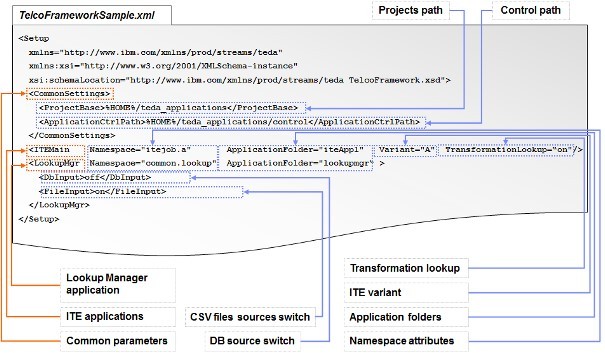
It defines three major parts:
- Common settings
- ProjectBase: Describes the path to the base directory of all projects.
- ApplicationCtrlPath: Describes the path to the folder that shares the application control states of the Lookup Manager and the ITE applications. The corresponding parameter is global.applicationControlDirectory.
- ITE applications
You can set up 0 or more ITE applications.
- Namespace: Defines the name space of the application. The name space must be unique for each application.
- ApplicationFolder: Defines the name of the application project folder in the workspace.
- Variant: Defines the variant of the ITE application (A, B or C). The following parameters are set according to the selected variant:
- ite.businessLogic.group
- ite.businessLogic.transformation.lookup
- ite.businessLogic.transformation.tupleGroupSplit
- ite.ingest.fileGroupSplit
- ite.ingest.fileGroupSplit.pattern
- TransformationLookup: Defines whether the ITE application is controlled by the Lookup Manager application.
-
Lookup Manager application
The setup definition supports 0 or 1 Lookup Manager applications.
- Namespace: Defines the name space of the Lookup Manager application. The name space must be unique.
- ApplicationFolder Defines the name of the application project folder in the workspace.
- DbInput: Enables or disables the database as a repository source. The corresponding parameter is lm.db.
- FileInput: Enables or disables the usage of CSV input files as repository source. The corresponding parameter is lm.file.