Examples
These examples demonstrate how to use the FMPFilter operator.
The following example produces a smoothed trend of the IBM stock prices and flags unusual events by using the FMPFilter operator:
use com.teracloud.streams.timeseries.modeling::FMPFilter;
composite Main {
  graph
    stream<rstring date, float64 open> stockStream = FileSource() {
      param
        file: "stock.csv";
        format: csv;
        initDelay: 1.0f;
    }

    stream<list<float64> prediction, list<int32> flags> trendStream = FMPFilter(stockStreams) {
      param
        inputTimeSeries: open; // input data
        degree: 2u;            // use a polynomial of degree 2
        memoryLength: 20u;     // use 20 samples as history lag (polynomial window)
        integration: 10u;      // use the past 10 values for estimating the variance
        thresholdFactor: 7u;   // threshold rate of the anomaly detection
        maxDimension: 40u;     // support up to 25 component in the input data
        cleanFrom: 25u;        // remove all anomalies from the data after 25th received tuple.
      output
        trendStream: prediction = predictedTimeSeries(),  // get smoothed trend
        flags = anomalousFlags();                         // get outlier (1 positive outlier and 0 negative outlier)
    }

    () as SinkOp1 = FileSink(trendStream) {
      param
        file: "trendStream.dat";
      format: csv;
        flush: 1u;
        writePunctuations: true;
    }
}
The following graph illustrates the prediction (trend) of stock prices by using the FMPFilter operator. The anomaly flag has a value of 1 when unpredictable data occurs; it has a negative value when the data is not anomalous.

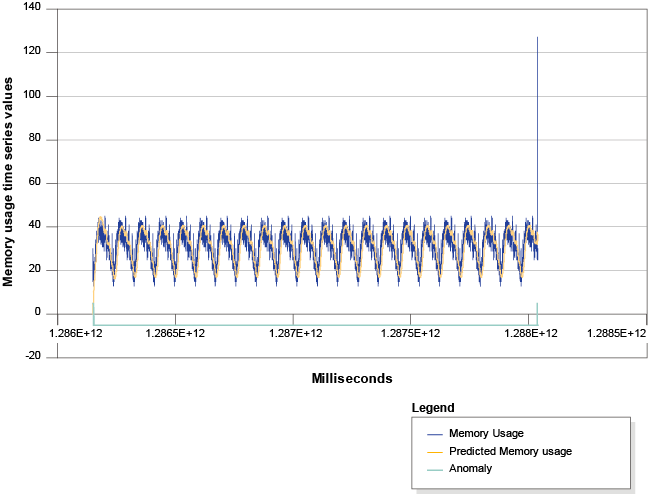
The following example detects anomalous computer memory usage by using the FMPFilter operator:
use com.teracloud.streams.timeseries.modeling::FMPFilter;
composite Main {
  graph
    stream<uint64 tstamp, list<float54> inputdata> datacenter = FileSource() {
      param
        file: "datacenter.csv";
        format: csv;
    }

    stream<list<float64> inputdata, list<int32> prediction,
      list<boolean> flags> predictedData = FMPFilter(datacenter) {
      param
        inputTimeSeries:  inputdata;
        degree: 2u;
        memoryLength: 50u;
        integration: 3u;
        thresholdFactor: 2.5u;
        maxDimension: 25u;
      output
        predictedData: prediction = predictedTimeSeries(),
        flags = anomalousFlags();
    }
}
The following graph shows a time series that simulates memory consumption from a computer. The FMPFilter operator is used to track memory consumption and detect anomalies: